
| Quick Summary: Open a browser, go to 10.0.0.1, and log in with admin and password. Change your Wi-Fi name, password, and security from the Xfinity gateway panel, or manage everything in the xFi app. |
The Xfinity gateway or modem/router package allow users to access their router settings for WiFi configuration, password changes, security enhancements and internet connection troubleshooting. This guide takes you through it in a very easy step by step manner.
Xfinity Router Default IP and Login Credentials
Use these default details to reach the Xfinity gateway admin panel. If they fail, check the sticker on your gateway.
| Setting | Default | Notes |
|---|---|---|
| Login URL | http://10.0.0.1 | Xfinity gateway default |
| Username | admin | Standard on xFi gateways |
| Password | password | Lowercase, case-sensitive |
| App option | Xfinity xFi app | Best for newer gateways |
How to Log Into Your Xfinity Router
- Open any web browser on your device.
- Type http://10.0.0.1 in the address bar.
- Press Enter to load the router login page.
- Enter username: admin.
- Enter password: password.
- Click Login to access settings.
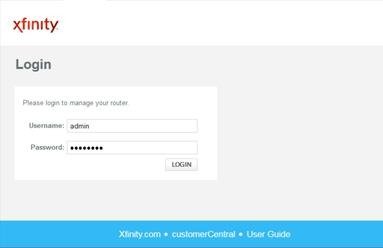
In case the abovementioned method fails you can consider checking router label for credentials.
What Is the Xfinity Router Login Page?
The router login page functions as the admin panel which controls the home network. From here, you can:
- Change your Wi-Fi name (SSID)
- Update your Wi-Fi password
- Manage connected devices
- Enable parental controls
- Restart or reset your gateway
- Adjust security and network settings
Requirements Before You Log In
Before accessing the admin panel, make sure:
- The device is either connected to the Xfinity Wi-Fi or using the Ethernet.
- Your Router/gateway is turned on.
- Require login credentials
How to Change Your Wi-Fi Name and Password
- Log into the router panel
- Go to Gateway, then Connection, then Wi-Fi
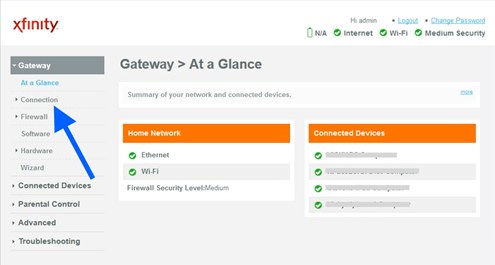
- Select your network (2.4GHz or 5GHz)
- Update:
- Network Name (SSID)
- Wi-Fi Password
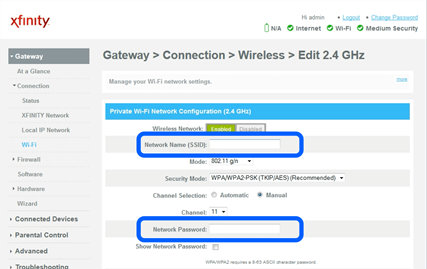
- Click Save
Your devices will need to reconnect using the new password.
Using the Xfinity App (Alternative Method)
Most of the newer Xfinity gateways are controlled through Xfinity xFi mobile app rather than by the web login.
With the app, you can:
- Change Wi-Fi details
- Pause Wi-Fi on specific devices
- Run speed tests
- Set parental controls
- Troubleshoot issues
If the browser login page doesn’t open, try managing your network through the official app.
Troubleshooting Xfinity Login Problems
10.0.0.1 Will Not Open
Make sure your device is connected to the Xfinity network, not mobile data. Type 10.0.0.1 into the top address bar, not the search box. Restart your gateway, wait one minute, and try again.
Admin and Password Do Not Work
Check the sticker on the side or bottom of your gateway for custom credentials. If you changed the password before and forgot it, a factory reset restores the defaults.
Factory Reset the Gateway
Press and hold the Reset button on the back of the gateway for about 30 seconds until the lights blink. This restores factory defaults. Warning: this erases your custom Wi-Fi name and password.
Security Tips for Your Router
A few quick habits keep your Xfinity network safe from unwanted access.
- Change the default password immediately
- Use a strong Wi-Fi password (12+ characters)
- Enable WPA3 or WPA2 security
- Keep firmware updated
- Don’t share your router login details
Frequently Asked Questions: Xfinity Router
What is the default IP address for an Xfinity router?
The default gateway address is 10.0.0.1. Type http://10.0.0.1 into your browser to open the Xfinity login page. Some setups also respond at 10.0.0.1 through the xFi app.
What are the default Xfinity login credentials?
The default username is admin and the default password is password. Both are case-sensitive. If they do not work, check the label on your gateway for custom credentials.
How do I reset my Xfinity gateway?
Hold the Reset button on the back for about 30 seconds until the lights blink. The gateway returns to factory defaults, so you will need to set your Wi-Fi name and password again.
Can I manage Xfinity without the login page?
Yes. The Xfinity xFi app lets you change Wi-Fi settings, pause devices, and troubleshoot without the web login. It is the recommended method for newer xFi gateways.
How do I change my Xfinity Wi-Fi password?
Log in at 10.0.0.1, open Gateway, then Connection, then Wi-Fi. Select your network, enter a new password, and click Save. Reconnect your devices using the new password.
Related Router Login Guides
Using a different provider or brand? These step by step guides cover the same process.